2. HOW YOUR CAMERA METER SEE'S
One of the things I find most beginning photographers don't understand is how to get proper exposures. This is the one thing when I mentor a new student, wants to learn first and should. It is one of the most important parts of creating images. But to understand exposure you need to know how a camera meter works first. Before we get into that discussion, let’s talk about the two different types of light meters. That way, you should have little better understanding of the type of meter your camera uses.
There are two different types of light meters, incident and reflected light meters. All cameras only use reflective meters. To use an incident meter you will need to purchase a light meter like those from Sekonic. The advantage to having an incident meter is that they provide both incident and reflective metering. Incident meters measure the light falling on the subject. Reflected light meter's measure the light reflecting off your subject, see (example one). So let’s talk about the difference between the two and the advantages and disadvantages of both.
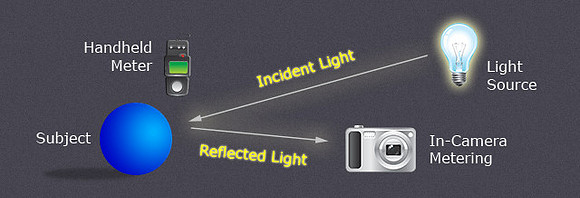

EXAMPLE ONE
All in-camera light meters have one fundamental flaw. They only measure the light reflecting off your subject. This means they can merely guess how much light is hitting the subject. So why is that a flaw you ask? That is because the tonal value or luminance of your subject influences how much light is reflected back. To explain why that causes problems you need to understand how your camera meter uses that information.
The photography industry has adopted a standard which it considers a proper exposure to be. That standard is 18% grey or medium grey as some call it, see (example two). As you can see in example two, all four different colors have one thing in common. They have the same luminance or tonal value as each other. Your camera meter doesn’t care about color, only how dark or bright that color is. It doesn’t know if you're shooting a bride in a white dress or snow-covered mountains. So when your camera meter is reading a scene in front of it, it wants to make it 18% grey. There lies the problem, how often when you're taking pictures is everything in the scene 18% grey in tonality.
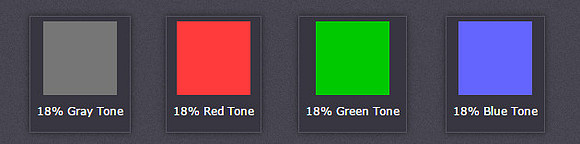 EXAMPLE TWO
Another way to illustrate the effect reflected light has on your camera meter see (example three). Those two shots were both taken on evaluative metering mode. I used aperture priority so the camera would pick what it thought was the correct exposure for each shot. Notice how the camera meter reduces the exposure when the white paper was introduced in the background. That is because the color black absorbs most of the light hitting it and reflects very little. The color white, does the complete opposite. Notice how the image with the white background looks medium grey, doesn't look white at all. That is because the color white reflects most of the light, and the meter wants to make it 18% grey.
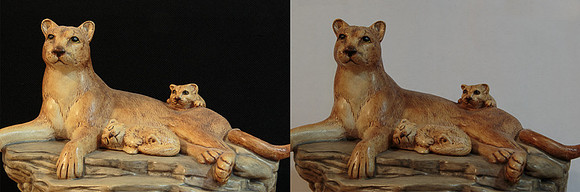 EXAMPLE THREE
Another flaw worth mentioning is that not all camera meters adhere to the industry standard of 18% gray, but closer 12-18%. It's also worth mentioning that some camera meters now do use color information to help calculate exposure. Like Nikon's 3D Matrix Meter and Canon's RGB+IR metering sensor. However, that is another whole discussion on its own. It does explain why some cameras do better than others on getting the exposure correct.
Now that you understand the flaws of your camera meter, let's talk about the advantages. The main advantage is that they take the reading from where you are and not the subject themselves. Another advantage is by using different metering modes like your spot meter, you can take a reading on just one small part of a scene. That brings us to our next discussion, which is incident light meter.
Incident meters only measure the light falling on the subject (example one). Because it isn’t affected by the luminance or tonal value of the subject in your scene, it isn’t fooled by dark or bright objects. It is only measuring the intensity of light source hitting it. They are very accurate and record colors and tones as they should be. This can be an advantage when trying to calculate the proper exposure for a given subject or scene. The one thing about incident meters is for them to be accurate; you must take the reading from where your subject is. This brings us to the disadvantage incident meters represent. Taking the light reading from the position of your main subject, isn’t always possible. You will find that especially true in landscape, sports or wildlife photography. That is why most incident meters work better for studio work, indoors or portrait photography. They can also work well outdoors, as long you can take the reading from where the subject is located.
So now how do you make sure you get the correct exposure every time? The rule of thumb a lot of professionals will tell you is to expose for the highlights in your scene and let the shadows fall where they may. That rule works reasonably well, but isn’t always the case and here is why. Just about every scene you shoot is going to be unique. Therefore, the elements in each scene that are your main subject or hold the most weight are thereby, different as well. So exposing for the important elements in your scene should be your priority. Here is an example of what I mean, see (example four). Since the gas station is my main subject, I needed to overexpose the sky so the gas station wasn’t underexposed like in (example five). Same thing if you're taking a portrait and the sun is to their back. If you exposed for the background or highlights, then the person is going to look more like a silhouette. So sometimes you need to make compromises when you're choosing your exposure. There are ways to overcome some of those exposure problems like the ones we just talked about. So let’s take a look at how to do that next.
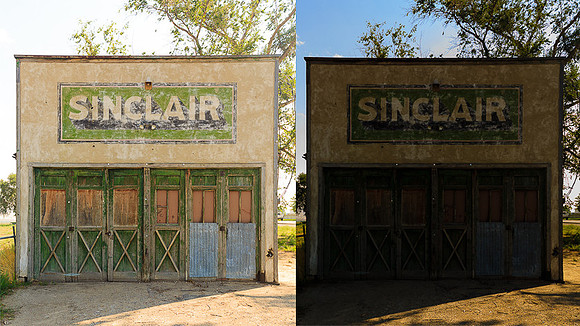 EXAMPLE FOUR EXAMPLE FIVE
Here are three ways to overcome exposure problems. Fill flash, HDR and neutral density graduated filters. There are other methods using Photoshop and multiple images that we will discuss in my next article. Fill flash is useful for portraits, or any subject that is within flash distance. HDR photography is popular now with digital cameras and most cameras have the option built in, so the camera can do it for you. You can also bracket a series of 3-7 images yourself, and then blend them later in Photoshop or with programs like Photomatix. Last is neutral density filters like those from Singh Ray. This is my favorite method for landscape photography. To explain each one of these in detail would need another whole article on its own. So please see my next article on "Dynamic Range and your camera."
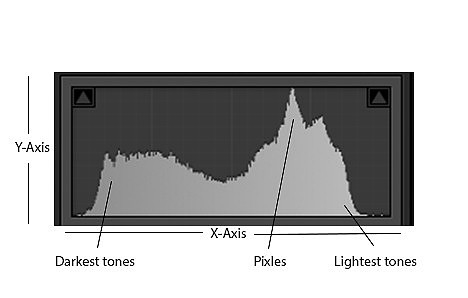
Now let's look at one of the best tools you have to ensure you get the correct exposure, and that is your camera's histogram. This is one of the finest tools a digital camera has to offer, but sometimes difficult for photographers to understand. The shadows on your histogram are on the left side with the darkest being zero; see (example six). The lightest tones are on the right side and the whitest tone that is achievable is 255; (example six). The X-axis represents all the shades between zero and 255. The Y-axis simple shows the number of pixels in each area of brightness. If your histogram touches either the extreme left-hand or right-hand side, it is "clipped." In that situation, there will be a loss of all detail in either the shadows or highlights.
 EXAMPLE SIX
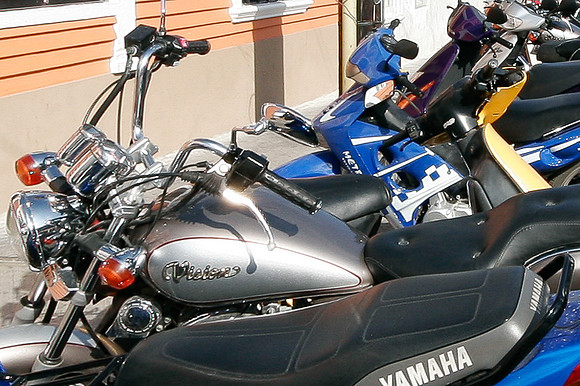
So the ideal exposure and to get the best tonal range in your image, the histogram should be in between the two like in example six. Due to the dynamic range of some images, it can be impossible sometimes to do that. So in those instances I would always expose for the main subject and let the highlights or shadows fall where they may. As I mentioned earlier, sometimes compromises are necessary when shooting that you can't avoid. There are times when it is impossible to expose the brightest highlights without clipping them and here is an example of what I'm talking about; see (example seven). The specular highlights on the handlebars are so bright that it is impossible to expose this scene properly without clipping on the histogram. So when confronted with those situations, it's ok to overexpose those areas. Our human eye cannot see the detail in those areas any ways, so they look natural to us.
 EXAMPLE SEVEN
Last let's discuss the one feature that your camera has to help you get proper exposures, which is exposure compensation. Exposure compensation is the control by which you can force your camera to make the exposure brighter or darker. It's available in most auto modes, aperture priority, shutter priority, and you can also do it yourself in manual mode. You can select how much you want the camera to adjust your exposure + 5 stops in 1/3 or 1/2 stop increments. In manual mode, you can adjust the exposure for as many stops as needed.
Now you should start to understand why it is important to learn all your camera's features and controls. One thing I would like for you to take away from this article is that getting good exposures is easier than it may appear. It may seem difficult on the surface at first, but once you understand how to read a histogram that is 90% of it. Then learn how to use your camera so you take control over each exposure is the other 10%, and that is the secret formula. Well then you might ask why I need to know all this other stuff you talked about. Like what my camera meter is doing and 18% grey, etc. That is because by understanding what your camera is doing, makes it much easier to know when to use things like exposure compensation. Which scenes your camera might or might not have problems correctly exposing. Or those compromises that you will sometimes need to make so you can get the best results for your image. Well good luck and remember practice, practice and more practice.
